Wednesday, November 7, 2012

Pale Blue Dot


This picture was captured by Voyager 1 satellite.

Some interesting features of the Satellite:

  • It was launched on September 5, 1977 by NASA. It is currently the farthest man-made object in universe. 
  • It's been operational ever since. The systems are shutting down one by one and will continue to operate until 2030. 
  • It is currently outside Solar System and travelling at speed of 17 KM/s.  No latest satellite can ever catch-up with Voyager 1 no matter how fast they are launched. If it continues to travel uninterrupted, it will be in proximity of next star in 40,000 years. 
  • A golden disc is attached to satellite with pictures and sounds from Earth, so that any intelligent life form that encounters the satellite can gain knowledge about earth. 
  • It is currently at a distance of about 11 billion KM from earth. At this distance any communication from earth to satellite and vice-versa takes about 17 hours when travelling at speed of light.

More updates to follow.


Monday, November 5, 2012

The most versatile word in English language


"F*CK YOU"

Perhaps one of the most interesting and colourful words in the English language is the word "f*ck". It is one magical word, which, just by its sound, can describe pain, pleasure, love and hate.

In language "f*ck" falls into many grammatical categories. It can be used as a verb, both transitive (John f*cked Rosy) and intransitive (Rosy was f*cked by John).

It can be an active verb (John really gives a f*ck) or a passive verb (Rosy doesn't give a f*ck); or an adverb (Rosy is f*cking interested in John), and as a noun (Rosy is a terrible f*ck).

It can be used as an adjective (Rosy is f*cking beautiful).

Besides its sexual connotations, this incredible word can be used to describe many situations:

1. Greetings.............."How the f*ck are you?"
2. Fraud...................."I got f*cked by the car dealer"
3. Dismay.................."Oh, f*ck it!"
4. Trouble................."Well, I guess I'm f*cked now."
5. Agression.............."F*ck You!"
6. Disgust.................."F*ck Me!"
7. Confusion.............."What the F*ck...?"
8. Difficulty................"I don't f*cking understand."
9. Despair................."F*cked again."
10. Incompetence......"He f*cks everything up."
11. Displeasure.........."What the f*ck is going on here?"
12. Lost......................"Where the f*ck are we?"

As you can see, there are very few words with the versatility of the word "f*ck".

It can be used to tell time..."It's five-f*cking thirty." It can be used in business..."How do I wind up with this f*cking job?" It can be maternal...as in "Motherf*cker". It can be political..."f*ck Bill Clinton".

And never forget the last words of the Mayor of Hiroshima..."What the f*ck was that?" and the immortal words of the Captain of the Titanic who said "Where is all this f*cking water coming from?"

The mind fairly boggles at the many creative uses of the word! How can anyone be offended when you use the word "f*ck"???

Use it frequently in you daily speech; it only adds to your prestige.

Lets all F*ck the Communications Decency Act .

Monday, October 26, 2009

Add only videos to playlists in iPhone/ iTouch

Hi there everyone,

I have been doing some research on internet and came across a problem that many people are facing. They say they cannot add video's to any playlists in iphone/itouch or rather the device doesn't recognize the video playlist. The simple solution for this is the smartplaylist feature in iTunes. Let's see the procedure of creating it......

Hypothetically speaking, Let's say you have 25 video's that you are adding to your device and some of them are English, some Spanish. Now I will show how to create two playlists which contain only English videos and only Spanish videos.

1. Add all the music videos that you need in a playlist to your iPhone/iTouch normally.
*** I recommend you check the "Manually manage music and video" option on your summary page in iTunes because you don't want to accidentally delete the entire content of your device.***

2. Select all the videos that belong in English playlist.

3. Right-click on the selected videos and select "Get Info" option in the pop-up menu.

4. iTunes will ask if you are sure you want to change the Information for all the selected items. Just click on OK or if you are not paranoid about it, you can click in the box that says 'Do not remind me again' and then click OK.

5. You will get a pop-up screen which looks like follows.


Here in the Genre field specify the tag for your purpose. ( Here you need to specify it is English Video).
Then click OK.

6. Go to File>> New smart playlist.
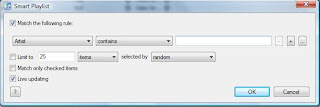
You will get a pop-up screen which looks like below.


7. In the first drop-down menu select Genre. In second drop-down menu select contains. In the following text-field type 'English Video'.

8. Make sure the check-box next to Live Updating is selected and then click OK.

Repeat Step 2 - Step 8 for Spanish videos.

9. Now you should find two new playlists on your device listing in iTunes.

10. Start your device's Ipod/Music application and browse playlists to play and select the new smart-playlists that you just created and enjoy the non-stop video playback.


Wednesday, April 30, 2008

The Discman!

The CDs and DVDs we so wantonly use and throw today wouldn't have even be possible had it not been for mind of James T Russell. He started off with his inventions at the age of 6, when he crafted himself a remote-controlled battleship, complete with a chamber for his lunch. After his B.A. in Physics, he worked as a physicist with General Electric, and was one of the first people in the world to use a colour TV and a keyboard with a computer.

Frustrated with the way his vinyl records were degenerating, he wanted to work on a system where audio could be read without any physical contact between the moving parts. The best way, he figured, would be if he represented the binary 0 and 1 as intesities of light - dark and bright respectively. Furthermore by squeezing more dark and light areas into the same space, he saw that he could store huge amounts of music on a piece of film.

His work on optical storage began in the Bettelle Memorial Institute, where he worked as a senior scientist, and he constructed his first prototype of a digital optical recording system. Data was recorded on a photo-sensitive platter, which became the first CD-ROM. The idea evolved through the 70's, but with few takers at first. Eventually, though, audio companies realised the obvious benefits, and the rest is history.

The Bit Defender

Prof Fred Cohen, on the 3rd of November 1983, created the first documented computer virus. He "injected" this virus into a graphical program called VD that was written for Vax mini-computer. In his demonstration, the virus paralyzed the operation of the computer.

The term 'virus' was coined only the next year. More than 110,000 virus exist today. Cohen started theoritical research in the early 1980's; he set up practical experiments involving viral programs to demonstrate data theft and to show how a virus could seize the functioning of computer by virtue of it's ability to replicate. In 1989, Cohen won the International Information Technology award for his work on data integrity protection.

Cohen has designed network protocals for secure tranfer of voice, video, and data. He helped to develop a cash-watch, which we now know as the electronic wallet. His recomendations for good practices in the data protection are now used the world over, including the idea that only system administrators should have complete access to critical components of a system like file servers, and that other users should have limited access. The ideas of regular backups and audit trials to be maintained regularly are also due to Cohen.

Saturday, April 12, 2008

NTLDR is missing

Problem!!!!!

when i turn on my computer while it is coming up , it says NTLDR is missing press alt+ctrl+del to restart and when i restart, it's happen again how can i fix it?

Now time for solution......


seems either your windows installation is formatted or the drive is corrupted or may be only the file is missing.

if the file is missing, boot your computer with windows xp installation cd. go to the repair screen that appears in the first phase. by typing 'r'.

select which xp installation you need to repair and then type in your administrator username and password.

then copy ntldr.ex_ from i386 folder on your cd into your windows installation directory

use this command:

copy z:\i386\ntldr.ex_ c:\windows\ntldr.exe

it should work for you.

if there was no problem with the missing file and the file system itself is corrupted then follow this procedure.

. Start your computer with the Windows startup disks, or with the Windows CD-ROM if your computer can start from the CD-ROM drive.
2. When the Welcome to Setup screen appears, press R to select the repair option.
3. If you have a dual-boot or multiple-boot computer, select the Windows installation that you want to access from the Recovery Console.
4. Type the administrator password when you are prompted to do so.

NOTE: If no administrator password exists, press ENTER.
5. At the command prompt, on the drive where Windows is installed, type chkdsk /r, and then press ENTER.
6. At the command prompt, type exit, and then press ENTER to restart your computer.

If this procedure does not work, repeat it and use the fixboot command in step 5 instead of the chkdsk /r command.


and finally if it were the case of deletion of windows installation you need to install windows again. if there is any doubt of data loss, then install the os without formatting. later after installation try to access the folders to see if your information is still available. or you can try the repair option available just before proceeding to format.

How to add "Reboot into safe mode" buttont to your start menu??

First of all we require a free utility known as BootSafe to achieve add "Reboot into Safe Mode" to your start menu. BootSafe can be downloaded from here. Copy this folder on your hard drive. A good place to store this file is \Windows\System32 folder.

Open the registry editor. Navigate to:
HKEY_CLASSES_ROOT\CLSID\{2559a1f6-21d7-11d4-bdaf-00c04f60b9f0}.

Double-click "default" in the right pane and set the value to "Reboot Into Safe Mode". Under this key, create a sub-key called "DefaultIcon" and set its default value to "C:\WINDOWS\system32\safeboot.exe".
Create another sub-key "InProcServer32", change its default value to
"%SystemRoot%\system32\shdocvw.dll", create a String Value "ThreadingModel" and name it "Apartment".

Next create a sub-key "Instance" and create a String named CLSID with the value
"{3f454f0e-42ae-4d7c-8ea3-328250d6e272}".
Under this create another sub-key "InitPropertyBag" and in the right pane, Create strings
CLSID with value {13709620-C279-11CE-A49E-444553540000},
"Command" with value "Reboot Into Safe Mode",
"method" with value "ShellExecute", and
"Param1" with value "C:\WINDOWS\system32\bootsafe.exe".

Restart the computer and you will find there's a new button called "Reboot Into Safe Mode" just above "Log Off" and "Shut Down" in the Start Menu. Click on this button once and select the type of Safe Mode you wish to boot into-Minimal, Networking (typical), or Repair, then click the Reboot button.

Once you have booted into Safe Mode, you can perform any actions needed, such as scanning for viruses, spyware, adware, malware, or repairing a system component.

When you have completed your tasks, Click again on "Reboot Into Safe Mode" on the Start Menu. Select Normal Restart option and click Reboot. XP will reboot in normal mode.

How to create an XP CD that requires no driver installation


  1. Download XP Unattended CD Creator and install the program.
  2. Launch the program and insert your XP CD.
  3. Copy all the contents of the CD. Eject the CD after copying the files.
  4. In the program's first tab-"Source CD"-Click select, and select the folder to which you copied the CD's contents.
  5. Select "work in source directory" under the "Target directory for new CD".
  6. Bypass all the other options and head to the Driver tab.
  7. Insert the CD that came with your motherboard.
  8. Give a name to the driver group in General Drivers text box, for example, "Gigabyte". Click add.
  9. Wait untill all the drivers get copied. Head straight to the Done tab, making no changes.
  10. Click Save and then on "Create ISO-image". Enter the path where the image should be written to.
  11. After completion, burn the ISO image to a CD using a disc burning tool such as Nero.

You are done!

Thursday, April 10, 2008

Blue Screen Variation

Problem!!!!!

STOP: 0x000000ED (0x81796E30, 0xC0000006, 0x00000000, 0x00000000)

Solution.....

The second parameter (0xbbbbbbbb) of the Stop error is 0xC0000006 which says UNMOUNTABLE_BOOT_VOLUME.

If you are lucky enough then the procedure given here will work.
But this won't work in around 90% of the cases. Any how this is worth trying.
If this procedure fails try the alternative described below.

In this case, restart the computer use XP installation CD to get to recovery console and then use the chkdsk /r command to repair the volume. After you repair the volume, check your hardware to isolate the cause of the file system damage.

To do this, use the following steps:
1. Start your computer with the Windows startup disks, or with the Windows CD-ROM if your computer can start from the CD-ROM drive.
2. When the Welcome to Setup screen appears, press R to select the repair option.
3. If you have a dual-boot or multiple-boot computer, select the Windows installation that you want to access from the Recovery Console.
4. Type the administrator password when you are prompted to do so.

NOTE: If no administrator password exists, press ENTER.
5. At the command prompt, on the drive where Windows is installed, type chkdsk /r, and then press ENTER.
6. At the command prompt, type exit, and then press ENTER to restart your computer.

If this procedure does not work, repeat it and use the fixboot command in step 5 instead of the chkdsk /r command.

Alternative:

The problem you mostly face about the procedure above is that
  • you may not be able to access C drive a.k.a. the windows installation drive. (or)
  • you may get to access the C drive but the file system is not recognized. (or)
  • your windows installation is not recognized. (or)
  • "autochk.exe file is not found. Please enter the path where file is located".
whatever the case is you are not supposed to format the drive because there is still chance of recovering the installation.

Blue Screen

Problem!!!!!

STOP: 0x000000ED (0x81796E30, 0xC0000032, 0x00000000, 0x00000000)

Solution.....

The second parameter (0xbbbbbbbb) of the Stop error is 0xC0000032 which says the file system is damaged.

In this case, restart the computer use XP installation CD to get to recovery console and then use the chkdsk /r command to repair the volume. After you repair the volume, check your hardware to isolate the cause of the file system damage.

To do this, use the following steps:
1. Start your computer with the Windows startup disks, or with the Windows CD-ROM if your computer can start from the CD-ROM drive.
2. When the Welcome to Setup screen appears, press R to select the repair option.
3. If you have a dual-boot or multiple-boot computer, select the Windows installation that you want to access from the Recovery Console.
4. Type the administrator password when you are prompted to do so.

NOTE: If no administrator password exists, press ENTER.
5. At the command prompt, on the drive where Windows is installed, type chkdsk /r, and then press ENTER.
6. At the command prompt, type exit, and then press ENTER to restart your computer.

If this procedure does not work, repeat it and use the fixboot command in step 5 instead of the chkdsk /r command.

Wednesday, May 30, 2007

World's costliest Ad

Everything is real with no graphics used costing some 6.2 million US Dollars and 606 takes and retakes. Team members of this Ad were facilitated with lots of rewards.

watch it here.

Honda Accord

Saturday, May 19, 2007

Silly points for the week!!!!

  • The least popular tourist nation of the world is North Korea.
  • Group of frogs is known as Army.
  • "Scouting for Boys by Baden Powell" is the fourth best seller of the 20th century. The top three best sellers are The Bible (Donno about the autor), The Koran, and Little Red Book by Mao.
  • The world's highest spoken language is Chineese Mandarin. No doubt about that, but more than half the people who speak mandarin can't do it fluently.
  • There are currently 946 Billioneers worldwide.
  • There are almost 200,000,000 blogs that aren't being updated!!!! (Glad this isn't one of them).
  • Shop-keepers of Britan are loosing around Rs. 6400 Crores annualy because of their incompetence at basic mathematics.
  • On that note, every four out of five wealthiest persons of Britan are foreigners.

Tuesday, May 15, 2007

'Useless Trivia of the week'

It was May 19th, 1780. Even though there wasn't any eclipse on that day, the provinces of Connecticut, Massachusetts, New Hampshire and parts of Eastern Canada which were under the governance of then England experienced night during the day. The night started by 2:00 PM and continued untill mid-night. The darkness was so severe that they needed candles for their household work. It was even thought as an E.L.E. (extinction level event). It was known as 'New England Dark Day' in history. Even today it is thought that smoke from forest fire was the reason to have sun blocked through out the day, but no definite reason was / is proposed yet.

Thursday, May 10, 2007

I'm back with more

  • "Stewardesses" is the longest word that can be typed with only the left hand.
  • The "pound" (#) key on your keyboard is called an octothorp.
  • The only domestic animal not mentioned in the Bible is the cat. 32. Rubber bands last longer when refrigerated.
  • The average person's left hand does 56% of the typing.
  • "Dreamt" is the only word in the English language that ends in "mt".
  • It's impossible to sneeze with your eyes open.
  • Coca-Cola can be used as car oil.
  • There are more chickens than people in the world.
  • The only word in the English Language with all vowels in reverse order is "subcontinental".
  • There are more telephones than people in Washington, D.C.


Did you know these things?

  • A raisin dropped in a glass of freshchampagne will bounce up and down continuously from the bottom of the glass to the top.
  • A duck's quack doesn't echo. No one knows why.
  • 315 entries in Webster's 1996 Dictionary were misspelled.
  • Because metal was scarce, the Oscars given out during World War II were made of wood.
  • The original name for the butterfly was "flutterby"!
  • Mosquito repellents don't repel. They hide you. The spray blocks the mosquito's sensors so they don't know you're there.
  • The first product to have a bar code was Wrigley's gum.
  • The first owner of the Marlboro Company died of lung cancer.
  • Michael Jordan makes more money from Nike annually than the entire Nike factory workers in Malaysia combined.
  • Adolf Hitler's mother seriously considered having an abortion but was talked out of it by her doctor.


First post of silly points

  • Worldwide sale of greeting cards is more for Mothers day when compared to other occasions.
  • On average a city-dwellers waits at Traffic signal for a green for about two weeks in their life.
  • In britan, number of bollywood pictures releasing is more compared to number of english releases.
  • We can't move our body while dreaming in sleep.
  • A zebra's skin is black in colour. It's fur is only striped in white.
  • When heated upto 1405o F, a diamond vapourizes.
  • Gorilla's are vegetarians. Their average life time in forest is 35 years. Whereas is zoo's they live upto 54 years.
  • If you eat excessive number of carrots, It turn your skin Orange.
  • In america, the price of one Oz. of potato chips is 200 time more than the price of one Oz. of potatoes.
  • Human scientists know more about the surface of moon, than they know about sea-bed.
  • Within 20 minutes of drinking honey, it mixes with blood.


Saturday, May 5, 2007

What happened on May 8th, 1885???

On May 8th, 1885 John Pembarton from Atlanta, America , a pharmasist by profession, took a syrup more likely a liquid in a jug and took it to his colleagues at the near by 'Jacobs Pharmacy'. They appreciated it's taste. So he sold the remaining liquid at 5 cents a glass. Over time the neighbours came to know about the taste of the liquid and it became quite popular. His friend Frank M. Robinson, a publicist, named the liquid Coca-Cola and wrote the logo by himself। Even today the same logo is used for the brand.

See some of it's Indian television commercials by clicking the image below


Let's start with a thump!!

On May 7th 1946 Akio Merita and Ibuka from tokyo with 20 employees started 'Tokyo Telecommunications Engineering Corporation' - known in japan as 'Tokyo Tsushin Kogyo K.K.'. They used transistor technology developed by Bell Laboratories and created a sensational product called pocket transistor radios. By 1960 they created the first Transistor based Television. Even today they are sailing the electronic world by large strides. This company is also called 'Sony Corporation'.